Setting Up the Project
Overview
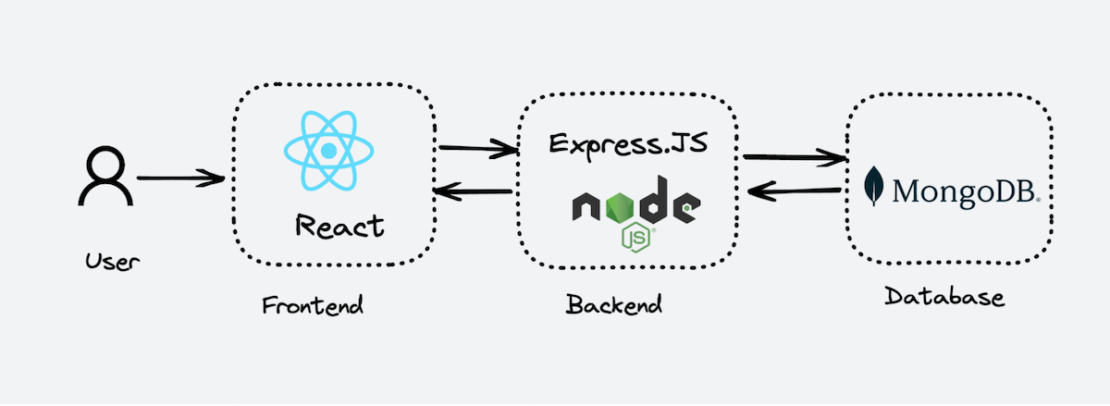
In this workshop, we will deploy a web application using the MERN Stack.
The MERN Stack consists of four main components: MongoDB, Express.js, React, and Node.js.
MongoDB – NoSQL database.
ExpressJS – Backend web-application framework for NodeJS.
ReactJS – JavaScript library for building UIs from UI components.
NodeJS – JavaScript runtime environment, allowing JavaScript to run outside the browser, along with other features.
We will deploy the project in an on-premise environment by creating Ubuntu servers through the VMware virtualization platform.
Below is the list of necessary servers:
| # | OS | Version | Server | Ram | CPU | Disk | IP | Username | Domain | Description |
|---|---|---|---|---|---|---|---|---|---|---|
| 1 | Ubuntu | 24.04 | Gitlab-Server | 3Gb | 2 | 20Gb | 192.168.181.101 | tranvi0910 | gitlab.tranvix.vn | |
| 2 | Ubuntu | 24.04 | Development Server | 2Gb | 1 | 20Gb | 192.168.181.102 | tranvi0910 | ||
| 3 | Ubuntu | 24.04 | Build Server | 2Gb | 1 | 20Gb | 192.168.181.103 | tranvi0910 |
GitLab Server:
This is the main server used to run GitLab, a platform for source code management and DevOps. GitLab provides features such as project management, source code repository, CI/CD (Continuous Integration/Continuous Deployment).
IP & Domain: 192.168.181.100, gitlab.tranvix.vn - Allows access to GitLab via the local IP or domain
gitlab.tranvix.vn.
Development Server:
- This server is used for development environments. Developers can deploy and test code here before pushing it to GitLab or other environments.
Build Server:
- This server is dedicated to building source code from projects. It can be integrated with GitLab to automate the build process when new code is pushed.
Using a domain name instead of a specific IP address in the Domain field offers several benefits, particularly in accessing GitLab. A domain name like gitlab.tranvix.vn is easier to remember than an IP address like 192.168.181.101. This makes it easier for users to access GitLab without having to memorize or look up the IP each time.