Performance Testing - k6
Installing k6
Create a shell script to install k6 on the Build Server.
#!/bin/bash
sudo gpg -k
sudo gpg --no-default-keyring --keyring /usr/share/keyrings/k6-archive-keyring.gpg --keyserver hkp://keyserver.ubuntu.com:80 --recv-keys C5AD17C747E3415A3642D57D77C6C491D6AC1D69
echo "deb [signed-by=/usr/share/keyrings/k6-archive-keyring.gpg] https://dl.k6.io/deb stable main" | sudo tee /etc/apt/sources.list.d/k6.list
sudo apt-get update
sudo apt-get install k6
Run the script:
sh install-k6.sh
Types of Performance Testing
Before using k6, let’s understand the definitions and differences between these types of performance testing.
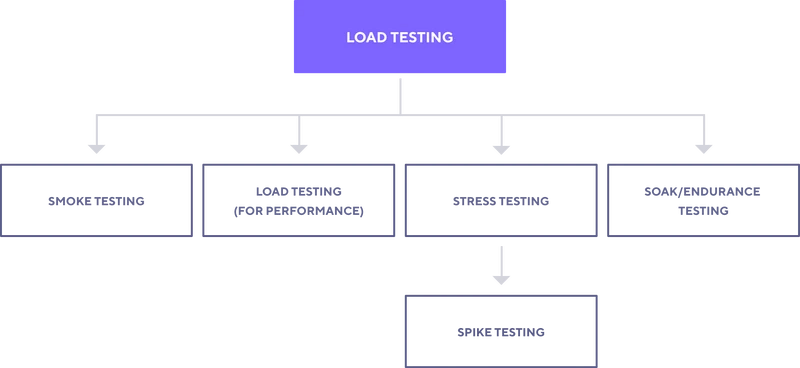
- Load Testing:
- This process tests software by applying a high load to measure and evaluate factors such as response time, system resource consumption, and system stability under high load.
- Smoke Testing:
This testing determines whether the software version can launch and operate normally with the most basic functions.
It is an initial test to decide if the software is stable enough for more detailed testing.
- Load Testing (for Performance):
- Focuses on evaluating system performance under specific load conditions to ensure it meets performance requirements such as response time and request handling within acceptable limits.
- Stress Testing:
This testing identifies the limits of the system by applying a higher load than expected, increasing and decreasing the number of users to test.
The goal is to find the breaking point of the system, allowing for optimization and preparation for sudden high loads.
- Spike Testing:
- A specific type of Stress Testing, this test simulates sudden load increases over a short period to assess the system’s ability to handle sudden load fluctuations.
- Soak/Endurance Testing:
- This testing evaluates system performance under a load over a long period to identify potential long-term performance issues like memory leaks or performance degradation over time.
Setting Up k6 Test
For example, create a load-test.js file and perform the test.
import http from 'k6/http';
import { check, sleep } from 'k6';

export let options = {
        vus: 100,
        duration: '10s',
        thresholds: {
                http_req_duration: ['p(95)<500'] // 95% request dưới 500ms
        }
};

export default function () {
        const BASE_URL = 'http://192.168.181.104:3000/';
        let res = http.get(BASE_URL);
        check(res, {
                'status was 200': (r) => r.status === 200,
        });
        sleep(1);
}
Output:
root@build-server:/tools/k6# k6 run load-test.js

          /\      |‾‾| /‾‾/   /‾‾/
     /\  /  \     |  |/  /   /  /
    /  \/    \    |     (   /   ‾‾\
   /          \   |  |\  \ |  (‾)  |
  / __________ \  |__| \__\ \_____/ .io

     execution: local
        script: load-test.js
        output: -

     scenarios: (100.00%) 1 scenario, 100 max VUs, 40s max duration (incl. graceful stop):
              * default: 100 looping VUs for 10s (gracefulStop: 30s)


     ✓ status was 200

     checks.........................: 100.00% ✓ 811       ✗ 0
     data_received..................: 781 kB  71 kB/s
     data_sent......................: 70 kB   6.4 kB/s
     http_req_blocked...............: avg=14.71ms  min=30.3µs   med=44.3µs   max=433.35ms p(90)=64.81ms  p(95)=105.95ms
     http_req_connecting............: avg=10.95ms  min=0s       med=0s       max=188.22ms p(90)=52.37ms  p(95)=95.06ms
   ✓ http_req_duration..............: avg=202.57ms min=2.04ms   med=200.53ms max=508.74ms p(90)=337.88ms p(95)=384.15ms
       { expected_response:true }...: avg=202.57ms min=2.04ms   med=200.53ms max=508.74ms p(90)=337.88ms p(95)=384.15ms
     http_req_failed................: 0.00%   ✓ 0         ✗ 811
     http_req_receiving.............: avg=1.67ms   min=85.7µs   med=150.2µs  max=120.63ms p(90)=1.18ms   p(95)=4.52ms
     http_req_sending...............: avg=31.14ms  min=40µs     med=69.8µs   max=354.27ms p(90)=117.14ms p(95)=148.13ms
     http_req_tls_handshaking.......: avg=0s       min=0s       med=0s       max=0s       p(90)=0s       p(95)=0s
     http_req_waiting...............: avg=169.76ms min=921.41µs med=151.78ms max=440.52ms p(90)=300.11ms p(95)=334.18ms
     http_reqs......................: 811     73.898412/s
     iteration_duration.............: avg=1.29s    min=1s       med=1.29s    max=1.68s    p(90)=1.46s    p(95)=1.5s
     iterations.....................: 811     73.898412/s
     vus............................: 2       min=2       max=100
     vus_max........................: 100     min=100     max=100


running (11.0s), 000/100 VUs, 811 complete and 0 interrupted iterations
default ✓ [======================================] 100 VUs  10s
data_received:
- The total amount of data received from the server through HTTP requests during the test.
data_sent:
- The total amount of data sent from the client to the server through HTTP requests during the test.
http_req_blocked:
The time blocked before the HTTP request is sent (possibly due to bandwidth limits, resource constraints, etc.).
Indicates how long the request had to wait before being processed.
http_req_connecting:
- The time to connect to the server after sending the request.
http_req_duration:
- The total time to complete the HTTP request, from start to finish, including the response.
http_req_failed:
- The number of failed HTTP requests (could be due to network errors, server errors, etc.).
http_req_receiving:
- The time to receive data from the server after the HTTP request has been sent.
http_req_sending:
- The time to send data to the server (client -> server).
http_req_tls_handshaking:
The time to establish a secure connection (SSL)
Time taken for TLS handshake for HTTPS connections.
http_req_waiting:
- The time to wait for a response from the server after sending the HTTP request.
http_reqs:
- The total number of HTTP requests made.
iteration_duration:
- The time to perform one iteration of the test script.
iterations:
- The total number of iterations performed in the test script.
vus:
- The number of virtual users currently performing the test.
vus_max:
- The maximum number of virtual users during the test.
Thus, we have successfully installed k6 and performed a basic test.