Setting Up the CI/CD Pipeline
Diagram
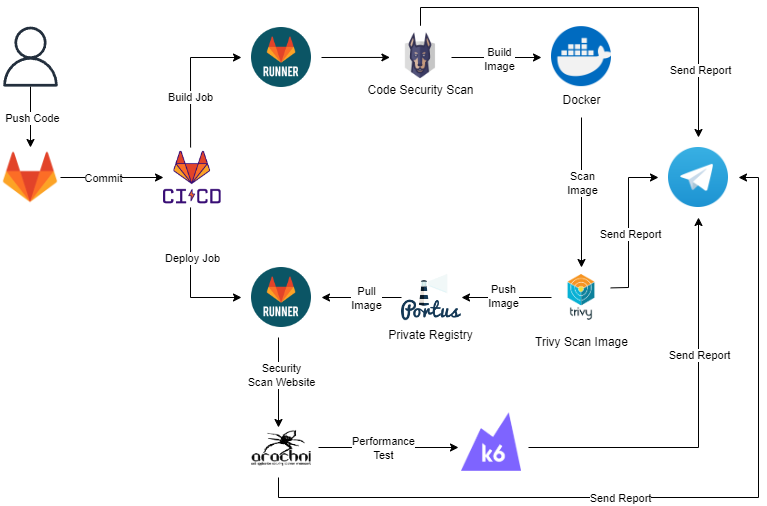
This diagram illustrates the automated CI/CD process for a web application using the MERN stack (MongoDB, Express.js, React.js, Node.js). This process ensures that the source code is continuously and efficiently built, tested, scanned for security, and deployed.
Push Code (User to GitLab):
- Developer pushes the source code of the MERN stack application to the GitLab repository. This action triggers the CI/CD process.
CI/CD Process (GitLab CI/CD):
Commit: When the source code is pushed, a commit is created in the GitLab repository.
The GitLab CI/CD pipeline starts and includes several jobs performed by runners.
Build Job (GitLab Runner):
Build Frontend (React.js): GitLab Runner builds the frontend application using React.js, including installing dependencies and generating the necessary static files.
Build Backend (Node.js and Express.js): Similarly, the backend is built using Node.js and Express.js, ensuring all dependencies are installed and the source code is compiled if needed.
Build Docker Image: The entire MERN stack application is packaged into a Docker image for easy deployment and management.
Image Scanning (Docker and Snyk):
The Docker image is scanned for security vulnerabilities using tools like Snyk.
Send Report (to Telegram): The security scan results are sent via Telegram to notify the development team of the security status of the image.
Deploy Jobs (GitLab Runner):
- If the build and security scan processes are successful, the next step is deploying the application.
- Deploy Frontend and Backend: GitLab Runner deploys the frontend (React.js) and backend (Node.js and Express.js) to the production or staging environment.
Image Management (Portus):
Pull Image (Portus): Docker image is managed through Portus, where the image is pulled from this registry.
Push Image (Portus): After management, the image is pushed to Harbor for storage and additional security scans if needed.
Security Scanning (Arachni):
- The deployed application is scanned for security vulnerabilities using Arachni to detect flaws in the web application.
Performance Testing (k6):
After ensuring security, performance testing is conducted using k6 to ensure the application performs well under high load.
Send Report: The performance testing results are sent via Telegram to notify the development and operations teams.